# Notes about nomenclature and symbols

This page summarizes the definitions this guide uses for Ansys projects, as well as what some of the symbols you see mean.

#### Nomenclature

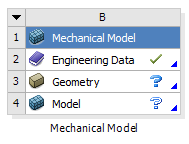
<table border="1" class="align-center" id="bkmrk-system-this-entire-b" style="border-collapse: collapse; width: 100%; border-width: 1px; height: 274.375px;"><colgroup><col style="width: 13.7068%;"></col><col style="width: 31.4449%;"></col><col style="width: 54.8483%;"></col></colgroup><tbody><tr style="height: 163.391px;"><td>**System**

</td><td style="height: 163.391px;">[![image.png](https://wiki.ufsolargators.org/uploads/images/gallery/2025-01/scaled-1680-/2Stimage.png)](https://wiki.ufsolargators.org/uploads/images/gallery/2025-01/2Stimage.png)

</td><td class="align-left" style="height: 163.391px;">This entire box is a **system**. The blue header at the top is how you control the systems overall properties</td></tr><tr style="height: 51.3906px;"><td>**Step**

</td><td style="height: 51.3906px;">[![image.png](https://wiki.ufsolargators.org/uploads/images/gallery/2025-01/scaled-1680-/4TEimage.png)](https://wiki.ufsolargators.org/uploads/images/gallery/2025-01/4TEimage.png)

</td><td class="align-left" style="height: 51.3906px;">Each row in the system is a **step.** Each step has tasks that must be completed within a certain software such as ACP or Mechanical. The step symbol on the right tells you what the step's status is</td></tr></tbody></table>

#### Symbols

<table border="1" id="bkmrk-green-check-mark-thi" style="border-collapse: collapse; width: 100%; height: 135.984px;"><colgroup><col style="width: 15.378%;"></col><col style="width: 29.914%;"></col><col style="width: 54.708%;"></col></colgroup><tbody><tr><td>Green Check Mark</td><td>  
</td><td>This means the step is complete. All required information has been selected/input by the user</td></tr><tr style="height: 46.5938px;"><td style="height: 46.5938px;">Filled Blue Question Mark</td><td style="height: 46.5938px;">  
</td><td style="height: 46.5938px;">This means the step needs additional user input to proceed to the next step</td></tr><tr style="height: 29.7969px;"><td style="height: 29.7969px;">Outlined Blue Question Mark</td><td style="height: 29.7969px;">  
</td><td style="height: 29.7969px;">This means a previous step needs additional user input as well as this step</td></tr><tr style="height: 29.7969px;"><td style="height: 29.7969px;">Yellow Bolt</td><td style="height: 29.7969px;">  
</td><td style="height: 29.7969px;">This means the step must be updated to reflect some change, such as meshing or solving</td></tr><tr style="height: 29.7969px;"><td style="height: 29.7969px;">Green Check Mark and Yellow Bolt</td><td style="height: 29.7969px;">  
</td><td style="height: 29.7969px;">This means the step had been complete, but updates from above may cause the data this step holds to change</td></tr></tbody></table>
